Add to Pipeline
Use Add To Pipeline when you want to save the link to an opportunity, either for reference or for proposal development. The opportunity will be stored in your pipeline, and email notifications will be sent out when updates to the opportunity occur.
There are two methods to add to pipeline that address each view:
- Add to Company Pipeline
- The opportunity is made visible in your company pipeline, for all licensed users to review.
- You must add an opportunity to the company pipeline to edit it and to access the pursuit flow capabilities.
- You will be asked to select a Capture Status and Capture Manager for the opportunity.
- The Capture Manager and the users with Business Development Manager Roles will get email updates about any changes to the opportunity.
- Individual Add
- The opportunity is visible in your pipeline, but not in the company pipeline.
- You cannot edit the content, or access the Pursuit Flow tabs.
- You will still maintain the ability to add the opportunity to your Company Pipeline.
- If another user in your company adds the opportunity to the company pipeline, you will be given an "Observer" role in the opportunity.
How to Add An Opportunity to A Pipeline
You can add an opportunity to the pipeline from the opportunity search page, or from the opportunity information page.
Search Results:

Opportunity Header:

- Identify the opportunity you want to save.
- Press the
 button.
 - A new popup will appear allowing you to choose how the opportunity will be added. When you scroll over each button, a text box will appear above the button telling you what your choice entails.
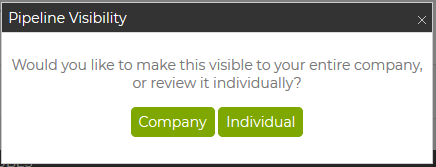
- Select the appropriate option for your needs.
- Company:
- The popup will now give you the options to enter 3 fields for the opportunity (most opportunities):
- Opportunity Alias (Nickname) - optional
- Capture Status - Required. Defaults to Identification
- Capture Manager - Required. Defaults to you
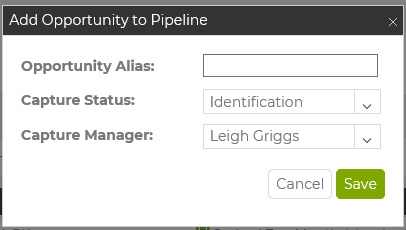
- Follow-on View of Add to Pipeline (visible when user selects an awarded opportunity with an approaching POP End Date):
- Opportunity Alias cannot be added here
- Checkbox for "Add this opportunity to pipeline" adds the awarded opportunity you are viewing to the pipeline.
- Capture Status - Required when box is checked. Defaults to Awarded - Lost.
- Checkbox for "Add follow-on opportunity to pipeline" adds the existing follow-on opportunity to your pipeline, or creates a C2P Forecasted opportunity for the follow-on if none exists.
- Capture Status - Required if box is checked. Defaults to Identification.
- Capture Manager - Required. Sets the same CM for both opportunities if both boxes are selected. Defaults to you.
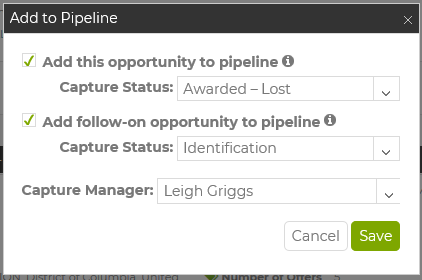
- Click Save and the opportunity will be added to your company pipeline.
- The popup will now give you the options to enter 3 fields for the opportunity (most opportunities):
- Individual:
- Click the button and no further action is needed. The "Add To Pipeline" button is still visible, but is now orange, to indicate that it is in your pipeline but not the company pipeline now.
- To Remove the opportunity from your pipeline, Click the "Remove Opportunity" button visible in My Pipeline.
- Company: